Prompt Version Control: Git for Your AI Prompts

Prompt Version Control: Git for Your AI Prompts
Meta Description: Learn how version control prevents prompt disasters. Track changes, rollback failures, and collaborate safely—with or without Git.
You finally nailed the perfect prompt. Then you tweaked it. Now it's broken, and you can't remember what changed.
This scenario plays out daily in AI development teams. Someone improves a prompt for customer support, ships it to production, and suddenly thousands of users receive unhelpful responses. The team scrambles to figure out what changed, but the original version is gone. There's no audit trail, no way to compare versions, and no quick path back to what worked.
The solution? Version control for your prompts—the same discipline that's kept software development sane for decades.
Key Takeaways
- Without version control, prompt changes create production disasters and lost productivity—yet a recent MIT study found that 95% of AI pilot programs fail, with unmanaged changes as a significant contributor
- Git's core concepts (commits, branches, diffs, merges) translate directly to prompt engineering workflows
- Semantic versioning (X.Y.Z) provides instant communication about the impact of prompt changes
- Proper rollback strategies minimize user impact when prompts break in production
Why Version Control Matters for AI Prompts
Lost changes plague every team that treats prompts as throwaway text. You write a brilliant prompt in a Slack message, someone copies it into code with slight modifications, another person "improves" it without documenting what changed. Three weeks later, the prompt stops working and nobody remembers the original.
This isn't just inconvenient. It's costly.
Teams waste hours recreating prompts from memory. Production systems deliver inconsistent results because different services use different prompt versions. When something breaks, there's no way to identify what changed or quickly revert to safety.
Version control eliminates these problems by treating prompts as valuable assets that deserve the same care as application code. Every change gets recorded, compared, and preserved. You can answer critical questions instantly: What changed? Who changed it? Why? And most importantly: how do we go back?
The Cost of Unmanaged Prompt Changes
Here's what happens in production without version control. Your support prompt handles 10,000 customer queries daily with an 87% satisfaction rate. Someone notices the responses feel too formal, so they change "provide assistance" to "help out." Minor tweak, right?
Wrong. That small wording change subtly shifts the model's behavior. Satisfaction drops to 71% overnight. Customers complain. Support tickets pile up. But the team doesn't realize a prompt changed because there's no tracking system. They spend days investigating API issues, model updates, and infrastructure problems before someone remembers the prompt edit.
The MIT NANDA initiative's research reveals the scale of this problem. According to their study, published in "The GenAI Divide: State of AI in Business 2025," a staggering 95% of enterprise AI pilots fail to deliver measurable impact. While multiple factors contribute to these failures, unmanaged prompt changes rank among the most preventable causes.
Prompts differ from traditional code in ways that make version control even more critical. Code either works or throws an error. Prompts can quietly degrade, producing technically valid but subtly wrong outputs. A single word change might affect thousands of interactions before anyone notices the pattern.
This creates the "works on my machine" problem for prompts. A modified prompt performs well in testing but fails in production because real user queries differ from test cases. Without version history, you can't identify when the problem started or quickly roll back to safety.
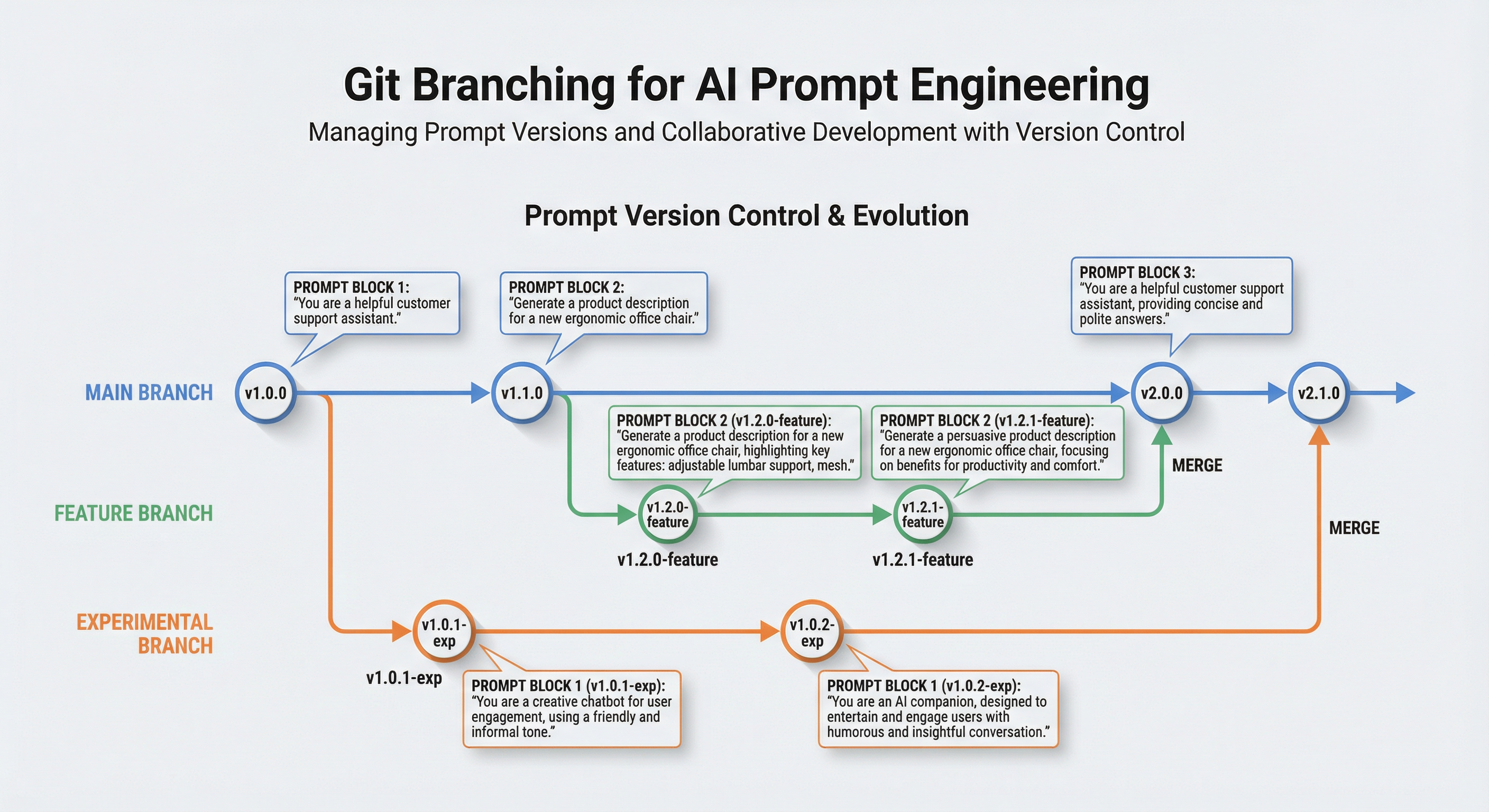
Version Control Concepts Applied to Prompts
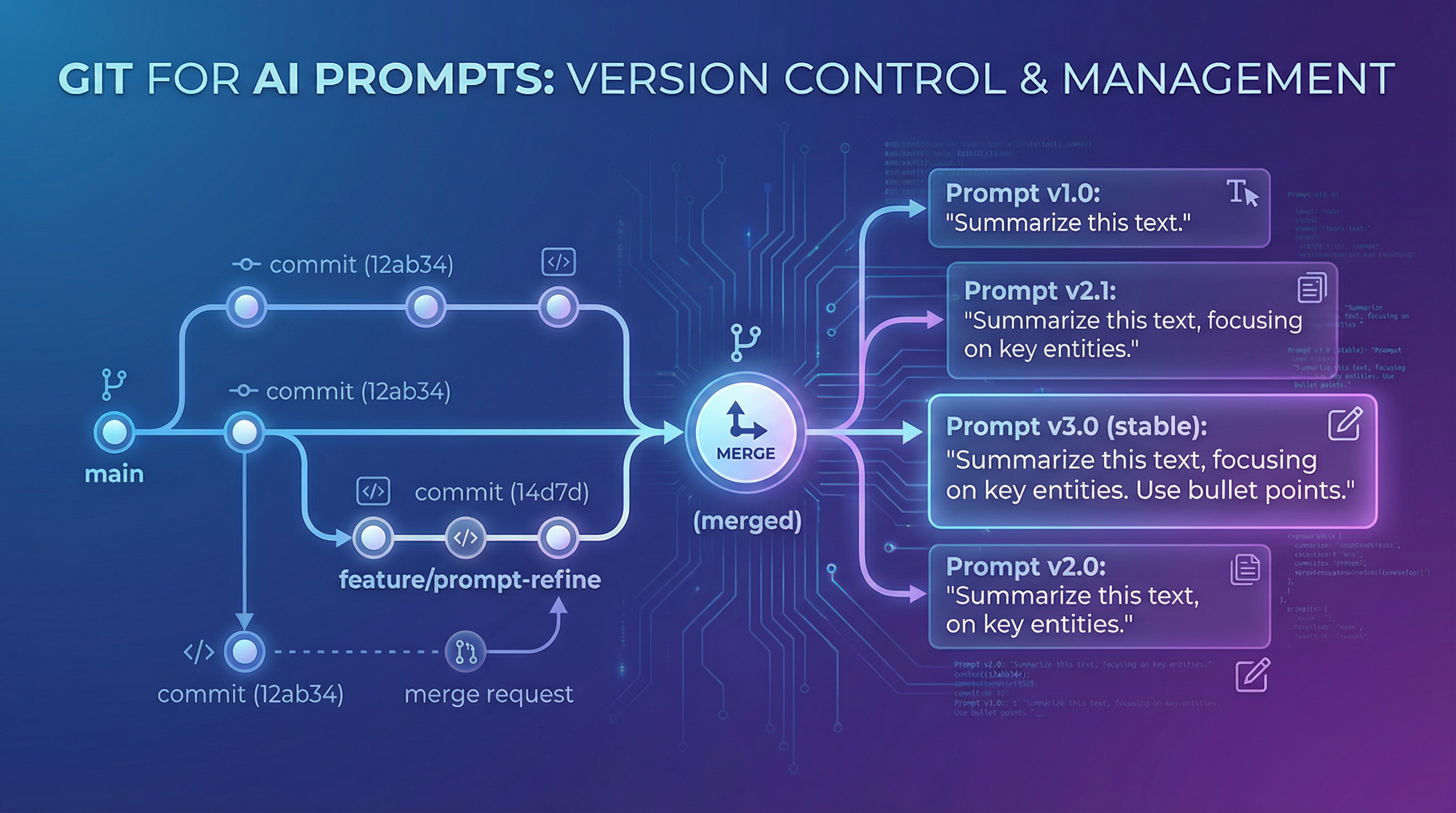
Git's fundamental concepts map cleanly to prompt management. Understanding these parallels helps teams adopt version control without learning entirely new workflows.
Commits represent prompt versions with descriptions. Every time you save a prompt change, you create a commit that captures the exact text, who changed it, when, and why. Think of commits as savepoints. If something goes wrong, you can load any previous savepoint instantly.
For prompts, a good commit message might be: "Refined tone to be more conversational while maintaining professionalism—testing showed 23% higher satisfaction." This context proves invaluable when debugging issues months later.
Branches enable testing variations without affecting production. You want to experiment with a more creative tone for your content generation prompt? Create a branch. Test it thoroughly. Compare results against the production version. Only merge it when you're confident it's better.
Branches let multiple team members work simultaneously without conflicts. One person tests prompt compression while another experiments with few-shot examples. Both branches exist independently until they're ready to combine.
Core Git concepts applied to prompt version control
Diffs show exactly what changed between versions. This is where version control becomes powerful for prompts. You can view a side-by-side comparison showing that version 2.1 added "Be concise in your responses" while removing "Provide detailed explanations." The visual diff makes changes obvious.
When a prompt suddenly underperforms, diffs let you trace backward through versions to identify the exact change that broke things. No more guessing.
Merge combines improvements from different team members. Your teammate improved the prompt's handling of edge cases while you refined its tone. Merging combines both improvements into a single, better prompt. Version control tracks both contributors and preserves the evolution.
These concepts work whether you use actual Git or a specialized prompt management platform. The principles remain constant: systematic tracking, comparison tools, and safe experimentation.
Semantic Versioning for Prompts (X.Y.Z)
Version numbers communicate meaning instantly when you use semantic versioning. The format is simple: X.Y.Z where each number has a specific purpose.
Major changes (X) signal complete restructuring or role changes. Bumping from v1.9.3 to v2.0.0 tells everyone: this is fundamentally different. You're not just tweaking the customer support prompt—you're converting it from reactive support to proactive engagement. Major version changes often require downstream updates to how systems process outputs.
A major version change might transform "You are a helpful customer support agent" into "You are a proactive customer success partner focused on preventing issues." The model's entire approach shifts, which means testing must be thorough and deployment carefully staged.
Minor changes (Y) add new instructions without breaking existing behavior. Going from v2.3.1 to v2.4.0 means you've added capabilities. Maybe you extended your prompt to handle refund requests when it previously only addressed product questions. The original functionality remains intact—you've just expanded the scope.
These changes are generally safe to deploy but still require validation. The new instructions shouldn't interfere with existing capabilities, but you need to verify that in practice.
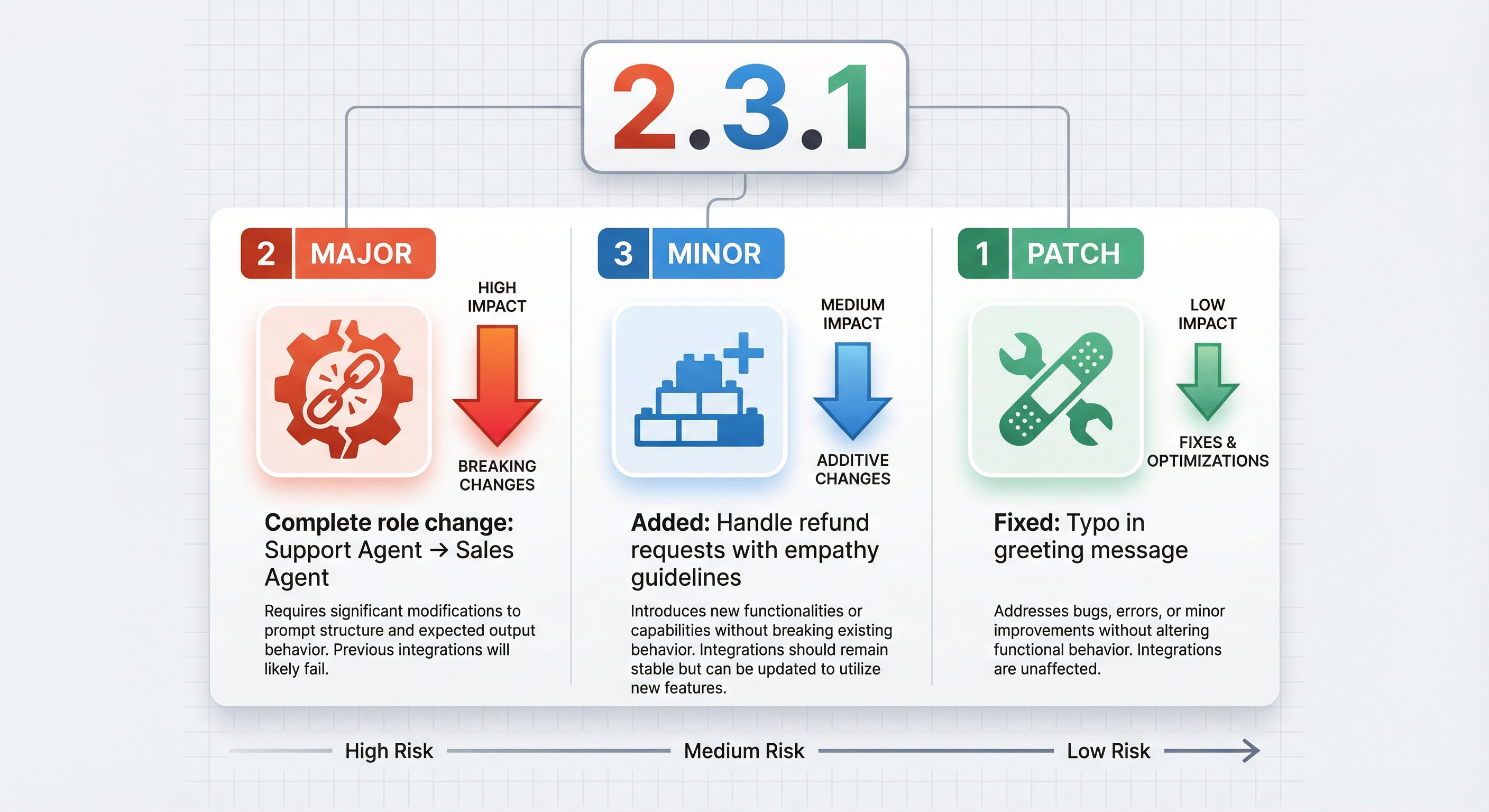
Patches (Z) fix typos, formatting, or small refinements. Version 2.3.1 to 2.3.2 represents a minor correction—maybe fixing "recieve" to "receive" or adjusting spacing. These changes shouldn't affect behavior at all, though with language models, even typos can sometimes have subtle impacts worth testing.
Semantic versioning creates a shared language for your team. When someone says "we need to ship v3.0," everyone understands that's a major change requiring extensive testing and careful rollout. "We're deploying v2.3.2" signals a low-risk patch that can move quickly.
Consider a customer support prompt at v2.3.1. The version number tells you: this is the third major iteration of the prompt's fundamental structure, it has been enhanced with three sets of new capabilities, and it includes one bug fix or refinement. That's a lot of information in three numbers.
Tracking Prompt Changes: What to Log
Effective version control requires more than just saving different versions. You need structured metadata that makes changes traceable and understandable.
Version number provides the anchor. Every version needs a clear identifier following semantic versioning conventions. This becomes the reference point for all discussions and debugging.
Change date and author establish accountability and timeline. When did this version ship? Who made the changes? These details matter during incident response. If a prompt starts failing, knowing it changed last Tuesday narrows your investigation window dramatically.
Description of what changed and why captures intent. "Updated tone" doesn't help future you. "Changed tone from formal to conversational based on user feedback showing 18% higher engagement rates" tells the complete story. Document both the what and the why.
Performance impact when tested turns versioning into a feedback loop. If you tested the new version against 100 sample queries and saw a 12% improvement in task completion, record that. If you didn't test it, note that too—it helps prioritize what needs monitoring after deployment.
Related test results or A/B test data provides quantitative backing for changes. Maybe you ran this prompt variant against 5% of traffic for two days and observed better metrics across the board. That data belongs in the version history.
Production deployment timestamp separates when a version was created from when it went live. You might create v2.4.0 on Monday but not deploy it until Wednesday after stakeholder review. Both dates matter for understanding system behavior.
A simple template helps maintain consistency:
textVersion: 2.4.0 Created: 2026-01-08 by Sarah Chen Deployed: 2026-01-10 14:30 UTC Changes: Added handling for billing inquiries; refined response length constraints Testing: Evaluated against 200 test cases; 94% accuracy vs. 89% in v2.3.2 Production Impact: Deployed to 10% of traffic; monitoring for 24h before full rollout
This level of documentation seems excessive until you're troubleshooting a production incident at 2 AM. Then it becomes invaluable.
Rollback Strategies When Prompts Break
Prompt failures need immediate response. Version control provides the foundation, but you need defined rollback strategies to minimize user impact.
Immediate rollback to last known good version should be a one-click operation. When monitoring alerts fire indicating degraded performance, your first priority is stopping the damage. The team can investigate root causes after users are no longer affected.
This requires keeping production systems configured to accept version updates without code deployment. Your application shouldn't have prompts hardcoded—it should fetch them from a versioning system that can switch versions instantly.
Test rolled-back version before re-deployment prevents repeated failures. Rolling back isn't complete until you've verified the previous version actually works in current conditions. Sometimes the issue isn't the prompt change but something environmental that will affect any version.
Quick smoke tests after rollback confirm you've restored service before you relax. This might mean processing a handful of test queries and checking outputs match expectations.
Staging environments for prompt testing catch issues before production. Every prompt change should run through a staging environment that mirrors production configuration. Real user queries from logs make excellent test cases—they expose edge cases your test team might miss.
Staging isn't optional for prompt changes, even though they seem simpler than code changes. The non-deterministic nature of language models means identical prompts can behave differently under production load or with real user input distributions.
Creating "stable" tags for production-ready versions establishes clear deployment gates. Not every version belongs in production. Development versions, experiments, and work-in-progress variants should be tagged appropriately. Only versions explicitly marked "stable" or "production" should be eligible for deployment.
This prevents accidental deployments of half-finished prompt revisions. Your deployment pipeline should enforce this rule: only stable-tagged versions can ship to production.
Recovery time objectives for prompt failures set team expectations. How quickly can you roll back a broken prompt? If the answer is "we need to update code, create a PR, get approval, and redeploy," that's too slow. Aim for rollback times under five minutes from detection to restored service.
This might require rethinking your architecture. Prompts stored as code in application repositories create deployment dependencies. Prompts managed through dedicated versioning systems decouple updates from code deployment cycles.
Version Control Tools Comparison
Teams have several approaches for implementing prompt version control, each with distinct tradeoffs.
Git-Based Approaches store prompts as files in repositories alongside application code. This approach leverages existing infrastructure and integrates seamlessly with development workflows. Developers already know Git, and CI/CD pipelines can include automated testing for prompt changes.
The downside? Git isn't designed for non-technical team members. Product managers and domain experts who need to iterate on prompts often lack Git expertise. Code reviews become bottlenecks for prompt updates. And deploying prompt changes requires full code deployment cycles, slowing iteration.
Best for: Engineering-heavy teams comfortable with code-based workflows and willing to trade iteration speed for tight integration with existing tools.
Prompt-Specific Tools like Promptsy, PromptHub, and Arize AX provide dedicated platforms for prompt management. These tools build version control specifically for prompts, adding features like visual diff views, integrated testing environments, and deployment workflows that don't require engineering involvement.
According to a recent analysis by Arize AI covering top prompt management tools of 2025, these platforms offer capabilities beyond traditional version control. They track prompt execution logs with metadata and token usage, support A/B testing natively, and enable non-engineers to manage prompts through user-friendly interfaces.
The limitation is adding another system to your stack. Teams need to integrate these tools through APIs or SDKs, which creates some architectural overhead. Pricing also scales with usage, whereas Git is free.
Best for: Teams with cross-functional prompt engineering where non-engineers need to iterate quickly, and organizations treating prompts as strategic assets worth dedicated tooling.
Spreadsheet or Doc-Based approaches track versions in shared documents. Each row in a spreadsheet captures a version number, timestamp, author, and prompt text. This works for small teams or early-stage projects.
The problems scale quickly. Spreadsheets lack diff views, branching, or rollback capabilities. Access control is crude. As prompt count grows, organization becomes chaotic. There's no automated testing or deployment integration.
Best for: Very small teams in early exploration phases who need something immediately and plan to migrate to proper version control soon.
Each approach solves the core problem—tracking prompt changes—but they differ in ease of use, integration complexity, and collaboration support. Choose based on your team composition and how central prompts are to your product.
Version Control in Promptsy
Promptsy's Version History feature (available on Solo+ plans) demonstrates how purpose-built tools address prompt versioning challenges that general version control systems weren't designed to solve.
Automatic version tracking for every edit eliminates manual commit steps. Every time you save a prompt change, Promptsy captures a new version automatically. There's no separate commit workflow to remember—versioning happens as part of your natural editing process.
This removes a common failure mode where engineers forget to commit changes, leading to undocumented versions in production. Automatic tracking ensures complete history without additional discipline.
Visual comparison between versions makes changes immediately obvious. The interface displays two versions side by side with highlighting that shows additions, deletions, and modifications. You can spot that v2.4 added three sentences about handling complaints while removing the greeting that felt too formal.
These visual diffs work better for prompts than code diffs because prompts are meant to be read as natural language. The comparison view presents them that way rather than as raw text files with line numbers.
One-click rollback to previous versions enables instant recovery. When you identify a problematic version, rolling back takes seconds. Select the version you want to restore, click rollback, and that version becomes current. The deployment system picks it up immediately—no code changes, no pull requests, no deployment pipeline delay.
Speed matters during incidents. Every minute users interact with a broken prompt damages trust and creates support burden. One-click rollback minimizes that window.
Team member attribution for changes provides accountability without blame. Every version shows who made the change and when. During post-incident reviews, this attribution helps the team understand decision-making and improve processes. It's not about finding fault—it's about learning from what happened.
Export version history for compliance and auditing satisfies regulatory requirements in industries where AI system behavior must be traceable. You can export complete version history showing exactly when prompts changed, who approved changes, and what modifications were made. This documentation supports audit trails and regulatory compliance.
Promptsy's approach recognizes that prompt engineering spans multiple roles. Product managers iterate on tone and messaging. AI engineers optimize for model behavior. Subject matter experts ensure domain accuracy. The Version History feature serves all these users without requiring Git expertise.
See version control in action with Promptsy's 14-day free trial at promptsy.ai.
Frequently Asked Questions
How is prompt version control different from code version control?
While the underlying principles are similar, prompts require version control systems that accommodate natural language editing and non-technical team members. Prompts also need stronger integration with testing and deployment workflows because even minor changes can subtly affect model behavior in ways that aren't immediately obvious like code errors would be.
Should every single prompt change create a new version?
Yes. Automatic versioning for all changes ensures complete history and eliminates judgment calls about which changes are "significant enough" to track. Storage is cheap; recreating lost prompt versions is expensive. Comprehensive version history lets you trace any production issue back to specific changes.
How do you handle version control for prompt templates with variables?
Version control should track the template structure including variable placeholders, not individual rendered prompts. For example, version your template as "Welcome {customer_name}, here's how we can help with {topic}" rather than versioning every filled-in variation. This keeps version count manageable while preserving the actual prompt logic.
What's the best rollback time target for production prompts?
Aim for sub-five-minute rollback from detection to restored service. This requires architecture that decouples prompts from code deployment—typically through a prompt management system that your application queries at runtime. Faster rollback directly reduces user impact during incidents.
Can you use standard Git for prompt versioning?
You can, and many teams do. Standard Git provides robust version control and integrates well with developer workflows. However, it creates barriers for non-technical team members who need to iterate on prompts and lacks prompt-specific features like visual comparison of natural language and integrated performance testing. Evaluate whether your team composition and needs justify a specialized tool.
The shift from ad-hoc prompt editing to systematic version control represents maturity in AI engineering. Teams that adopt these practices ship more reliable features, resolve incidents faster, and enable better collaboration across roles. Version control transforms prompts from disposable text into managed assets with clear lineage and accountability.
Whether you implement version control through Git, a specialized platform like Promptsy, or another system matters less than establishing the discipline itself. Track every change. Document why changes happened. Enable quick rollback when needed. These practices prevent the disasters that sink AI projects and build the foundation for reliable AI products.
Stay ahead with AI insights
Get weekly tips on prompt engineering, AI productivity, and Promptsy updates delivered to your inbox.
No spam. Unsubscribe anytime.