50+ ChatGPT Prompts for Customer Support Teams

Klarna processed 2.3M conversations with AI in one month—work of 700 agents with 82% faster resolution. This guide provides 50+ production-ready ChatGPT prompts organized by support scenario.
50+ ChatGPT Prompts for Customer Support Teams
Klarna processed 2.3 million customer conversations in a single month using AI. That's the work of 700 full-time agents. Resolution time? Dropped from 11 minutes to 2 minutes. And here's the part that surprised everyone—customer satisfaction stayed exactly the same as human-led support.
This isn't a pilot program. It's the new benchmark.
Look, I've spent 18 years in customer success, and I've watched a lot of "game-changers" come and go. But AI prompts for support? This one's real. The market hit $12.06 billion in 2024 and is racing toward $47.82 billion by 2030. By last year, 92% of Fortune 500 companies had plugged ChatGPT into their workflows.
The question isn't whether to use AI prompts. It's whether you're using them well—or just hoping the technology will figure itself out.
Here's the playbook: 50+ production-ready prompts organized by what your team actually deals with, plus the framework that makes the difference between "helpful bot" and "customer success multiplier."
What Makes a Prompt Actually Work
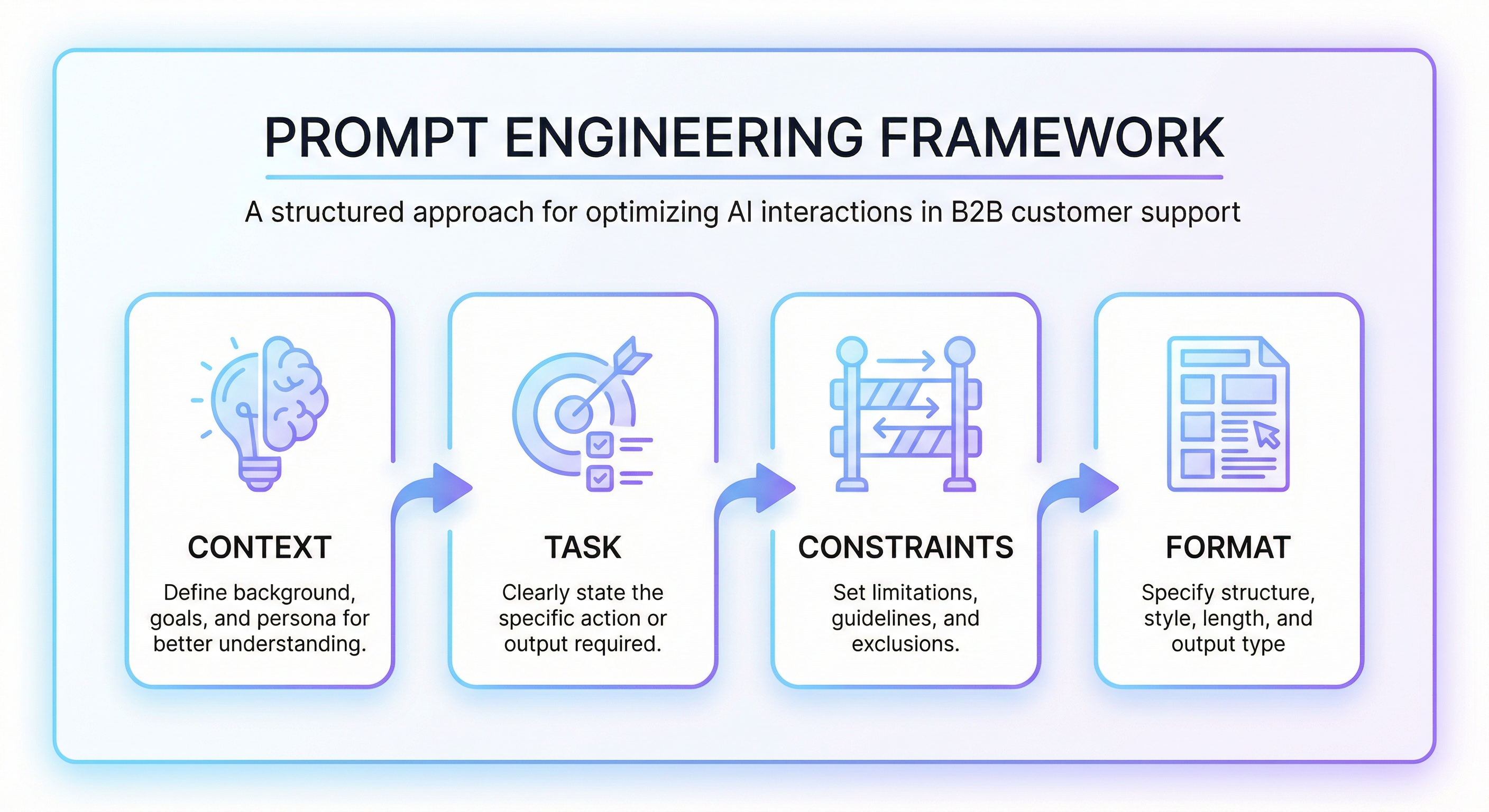
Before we get into the prompts, here's what separates the good ones from the ones that make customers angrier. Every effective support prompt has four pieces:
Context – Who is the AI? What company, what product, what's the customer dealing with?
Task – What exactly should the AI do? (Not "help the customer"—that's too vague.)
Constraints – What rules apply? Tone, length, policies, what to avoid.
Format – How should the response look?
Skip any of these and you'll get generic responses that read like they were written by a committee. Include all four and suddenly AI sounds like your best support rep.
Let's see how this plays out across 12 real scenarios.
1. Acknowledging Customer Inquiries
The first response sets everything. Get it wrong and you're already fighting uphill. 84% of agents say AI makes responding to tickets easier—but only when the prompts are specific enough to be useful.
Prompt 1: Initial Acknowledgment
You are a friendly support agent for [Company Name]. A customer just submitted a ticket about [issue type].

Task: Write a brief acknowledgment (2-3 sentences) that:
- Thanks them for reaching out
- Confirms you've received their issue
- Sets expectation for next steps

Tone: Warm, professional. No corporate jargon.
Prompt 2: Queue Position Update
Customer has been waiting 15 minutes in chat queue. They're asking about [issue].

Task: Write an apology for the wait that:
- Acknowledges the delay without over-apologizing
- Gives an estimated wait time of [X minutes]
- Offers a callback option

Keep it under 50 words.
Prompt 3: After-Hours Auto-Response
It's 11 PM and a customer submitted an urgent ticket about [issue].

Task: Write an auto-response that:
- Acknowledges receipt
- Confirms support hours (9 AM - 6 PM EST)
- Provides self-service resources for common issues
- Promises follow-up by [time]
2. Handling Complaints with Empathy
This is where most AI falls flat. But here's the thing—Allstate's AI actually scored higher on empathy than human representatives in customer interactions. The difference? The prompts forced acknowledgment before solution-jumping.
Prompt 4: Frustrated Customer Response
Context: Customer is frustrated about [specific issue]. They've used words like "terrible," "unacceptable," or "disappointed."

Task: Write a response that:
1. Acknowledges their frustration explicitly (use their exact words back to them)
2. Apologizes without being defensive
3. States what you're going to do to fix it
4. Gives a specific timeline

Rules:
- No "I understand your frustration" (cliché)
- Lead with acknowledgment, not explanation
- Under 100 words
Prompt 5: Service Failure Recovery
Our service was down for 4 hours. Customer lost work/data/time.

Task: Write a response that:
- Owns the failure (no "we apologize for any inconvenience")
- Explains what happened (briefly)
- Details compensation/credit offered
- Describes steps taken to prevent recurrence

Tone: Accountable, not defensive.
Prompt 6: Escalation-Preventing Response
Customer has asked to speak to a manager about [issue].

Task: Write a response that:
- Validates their concern
- Demonstrates authority to resolve it
- Offers a concrete solution
- Keeps the door open for escalation if they prefer

Goal: Resolve without escalation while respecting their choice.
In my experience, prompt 6 is worth its weight in gold. Most escalation requests aren't about authority—they're about being heard. When AI demonstrates it's actually empowered to solve the problem, half of those requests evaporate.
3. Technical Support & Troubleshooting
AssemblyAI reduced response times from 15 minutes to 23 seconds. That's a 97% improvement. And they did it using AI for triage—not replacement, but acceleration.
Prompt 7: Step-by-Step Troubleshooting
Customer reports [technical issue] with [product/service].

Task: Generate a troubleshooting guide that:
1. Starts with the most common fix (80% of cases)
2. Provides 3-5 steps in order of likelihood
3. Includes what to check at each step
4. Ends with "if none of these work" next action

Format: Numbered list. Each step under 25 words.
Prompt 8: Error Code Explanation
Customer received error code [CODE] while trying to [action].

Task: Explain:
1. What the error means (plain English, no jargon)
2. Why it happened (most likely cause)
3. How to fix it (step-by-step)
4. How to prevent it in the future

Audience: Non-technical user.
Prompt 9: Feature Walkthrough
Customer asks: "How do I [specific feature]?"

Task: Write a tutorial that:
- Assumes they've never used this feature
- Uses numbered steps
- Includes what they should see at each step
- Mentions common mistakes to avoid

Format: 5-7 steps max. Include "You'll know it worked when..." at the end.
4. Order Management & Tracking
Prompt 10: Order Status Update
Customer asks about order #[NUMBER].

Current status: [shipped/processing/delayed]
Expected delivery: [DATE]
Last location: [CITY]

Task: Write a friendly status update that includes all relevant details. If delayed, acknowledge it proactively and offer [compensation option].
Prompt 11: Missing Package Response
Customer's package shows delivered but they haven't received it.

Task: Write a response that:
1. Expresses concern
2. Suggests places to check (doorstep, neighbors, mailroom)
3. Offers to file a carrier investigation
4. Explains the timeline for resolution
5. Mentions refund/replacement policy

Don't blame the carrier or customer.
Prompt 12: Order Modification Request
Customer wants to modify order #[NUMBER]. Requested change: [change].

Order status: [status]
Policy: Changes allowed until [condition]

Task: If change is possible, explain how. If not, explain why and offer alternatives (cancel + reorder, partial modification, etc.)
5. Product Recommendations
70% of consumers now use generative AI for product recommendations over traditional search. That shift is massive. And it means your recommendation prompts better be good.
Prompt 13: Needs-Based Recommendation
Customer needs: [stated requirement]
Budget: [range or "not specified"]
Use case: [how they'll use it]

Product catalog context: [relevant products]

Task: Recommend 2-3 products with:
- Why each fits their need
- Key differentiator between options
- Clear "best for [use case]" label

Don't oversell. Be honest about trade-offs.
Prompt 14: Comparison Request
Customer asks: "What's the difference between [Product A] and [Product B]?"

Task: Create a comparison that:
- Lists 3-4 key differences
- Explains who each product is best for
- Avoids "both are great" non-answers
- Ends with a clear recommendation based on their stated need

Format: Brief comparison table + recommendation paragraph.
6. Returns & Refunds
Prompt 15: Standard Return Authorization
Customer wants to return [product] purchased [date].
Return policy: [X days], [conditions]
Return status: [eligible/ineligible]

Task: If eligible, provide return instructions. If ineligible, explain why and offer alternatives (exchange, store credit, partial refund).

Tone: Helpful, not defensive about policy.
Prompt 16: Defective Product Return
Customer reports [product] is defective. Issue: [description].
Purchase date: [date]
Warranty status: [in/out of warranty]

Task: Express concern about the defect, offer immediate replacement/refund, and explain return process. Don't require extensive documentation for obvious defects.
Prompt 17: Out-of-Policy Exception Request
Customer requests return outside policy window.
Purchase date: [X days ago]
Policy: [X days]
Customer history: [good/new/issue-prone]

Task: If exception is warranted, approve it gracefully. If not, explain the policy, offer alternatives (store credit at reduced value, exchange only), and document reasoning.
7. Billing & Payment Issues
Prompt 18: Unexpected Charge Explanation
Customer asking about charge of $[amount] on [date].
Charge is for: [service/product]
Reason: [subscription renewal/usage/fee]

Task: Explain the charge clearly, provide receipt/documentation, and offer to adjust if it was an error. If the charge is correct, explain the value they received.
Prompt 19: Payment Failure Resolution
Customer's payment failed. Reason: [declined/expired/insufficient funds].
Service status: [active/suspended/at risk]

Task: Explain what happened (without embarrassing them), provide steps to update payment, and clarify service implications. Offer payment plan if appropriate.
Prompt 20: Refund Processing Update
Customer asking about refund status.
Refund amount: $[amount]
Initiated: [date]
Expected processing: [X days]
Current status: [processing/complete]

Task: Provide clear status update, explain any delays, and give specific timeline for funds to appear.
8. Account Management
Prompt 21: Password Reset Assistance
Customer can't reset password. Error: [message or "no email received"]

Task: Walk through:
1. Check spam folder
2. Verify correct email address
3. Alternative reset methods (phone, security questions)
4. Manual reset process if needed

Keep it simple—assume low tech comfort.
Prompt 22: Account Deletion Request
Customer requests account deletion.
Reason given: [if any]
Data retention policy: [X days]

Task: Confirm the request, explain what will be deleted vs. retained, mention any recovery period, and process the request. Don't try to talk them out of it—just be helpful.
Prompt 23: Subscription Change
Customer wants to [upgrade/downgrade/cancel] subscription.
Current plan: [plan]
Requested change: [change]
Billing cycle: [date]

Task: Explain the change, proration/credits, and confirm the action. For cancellations, mention what they'll lose access to but don't guilt them.
9. Escalation Management
Prompt 24: Warm Handoff to Human Agent
AI has been handling this conversation. Issue: [summary]. Customer now needs human help because: [reason].

Task: Write a handoff message that:
- Summarizes the issue and what's been tried
- Introduces the human agent
- Sets expectation for response time
- Thanks the customer for their patience

Keep it seamless—don't make them feel like they've been talking to a bot.
Prompt 25: Supervisor Escalation
Customer requested supervisor. Reason: [dissatisfaction with resolution/policy disagreement/other].

Task: Acknowledge their request, explain the supervisor will review within [timeframe], and document:
- Issue summary
- Actions taken
- Customer's desired resolution
10. Proactive Communication
Jay Patel at Cisco said it well: "In 2025, brands will adopt AI agents that embody their unique values, personality, and purpose." Proactive communication is where that personality shows.
Prompt 26: Service Disruption Notice
Service will be down for maintenance.
Duration: [X hours]
Date/time: [datetime]
Affected: [services]

Task: Write a proactive notification that:
- Leads with the impact
- Provides specific timing
- Suggests workarounds
- Promises update when resolved

Tone: Respectful of their time.
Prompt 27: Shipping Delay Alert
Customer's order #[NUMBER] is delayed.
Original ETA: [date]
New ETA: [date]
Reason: [carrier/weather/inventory]

Task: Notify them proactively, apologize, and offer [compensation option]. Don't wait for them to ask.
Prompt 28: Renewal Reminder
Customer's [subscription/warranty/service] expires in [X days].
Current plan: [plan]
Renewal price: [amount]

Task: Write a helpful reminder that states the expiration, explains what happens if they don't renew, and provides easy renewal link. No high-pressure tactics.
11. Feedback Collection
Prompt 29: Post-Resolution Survey
Issue resolved: [summary]
Resolution: [what was done]

Task: Write a brief follow-up that:
- Confirms resolution
- Asks one specific question about the experience
- Makes feedback submission easy (1-click rating)
- Thanks them

Max 50 words before the question.
Prompt 30: Negative Feedback Response
Customer left negative feedback: "[exact feedback]"
Rating: [X/5]
Issue was: [resolved/unresolved]

Task: Write a response that:
- Thanks them for honest feedback
- Acknowledges the specific complaint
- Explains what you're doing about it
- Offers direct contact for follow-up

Don't be defensive or make excuses.
12. Closing Conversations
Prompt 31: Issue Resolved Closing
Issue was: [summary]
Resolution: [what was done]
Follow-up needed: [yes/no]

Task: Write a closing message that:
- Confirms the resolution
- Summarizes what was done
- Provides relevant resources
- Invites future contact

Under 75 words.
Prompt 32: Unresolved Issue Follow-Up
Issue: [summary]
Status: Awaiting [internal team/customer info/vendor]
Expected resolution: [date/timeframe]

Task: Write a check-in message that updates them on status, reconfirms timeline, and offers interim solutions if available.
Getting Started: The Three-Prompt Minimum
Here's the thing—you don't need all 50+ prompts tomorrow. Start with three:
- One acknowledgment prompt (Prompt 1)
- One complaint handling prompt (Prompt 4)
- One technical support prompt (Prompt 7)
Run them for a week. Track response time and satisfaction scores. See what breaks.
Then expand one category at a time.
Building Your Playbook
Once individual prompts are working, bundle them into a custom GPT with:
- A system prompt that defines your brand voice and universal rules
- A knowledge base with your docs, policies, and FAQs
- Your prompt library as reference material
This is how teams hit 50-70% AI resolution rates while keeping quality high. Octopus Energy got 44% of interactions handled by AI—doing the work of 250 agents. H&M saw 70% faster response times. Bank of America's Erica resolves 98% of queries in 44 seconds.
These numbers are achievable. The prompts are the path.
What I've Learned
After watching dozens of support teams implement AI prompts, here's what separates the ones that work from the ones that don't:
Specificity is everything. Vague prompts make vague responses. Every prompt needs context, task, constraints, and format. No shortcuts.
Start smaller than you think. Three prompts for one week teaches you more than 50 prompts on day one.
Empathy is a design choice. AI can match or exceed human empathy—but only when the prompt explicitly requires acknowledgment before solution.
The benchmarks are real. Klarna's 82% faster resolution. Bank of America's 98% in 44 seconds. These aren't outliers—they're proof of what's possible when prompts are built deliberately.
Sebastian Siemiatkowski, Klarna's CEO, put it this way: "This AI breakthrough means superior experiences for customers at better prices, more interesting challenges for employees, and better returns for investors."
He's right. But it only works if the prompts work.
Build yours with care.
Aisha Bello is VP of Customer Success at Promptsy, where she leads customer onboarding, retention, and expansion strategies. She's spent 18+ years turning at-risk accounts into advocates.
Stay ahead with AI insights
Get weekly tips on prompt engineering, AI productivity, and Promptsy updates delivered to your inbox.
No spam. Unsubscribe anytime.